Set the BOOM-PAD scope to a stand, store, warehouse, selected group, or every location together.
 BOOM ACCESS
Built for fireworks people, by fireworks people.
Run the whole season from one command center.
Sales, inventory, purchasing, consignments, reporting, and operational control—built around how fireworks businesses actually work.
Season-ready operations
Does this sound like your operation?
BOOM is not a generic ERP adapted by engineers who have never operated a fireworks business. It was built by a fireworks business owner who experienced the same problems you have—trying to force restaurant POS systems, online-sales platforms, and overly complicated business software to handle the way fireworks are actually purchased, stored, transferred, consigned, and sold.
BOOM connects wholesale operations with a built-in, connected retail POS, so case purchasing, each-level sales, warehouses, stands, consignments, receiving, inventory, reporting, and settlements all work together in one system designed around the way you actually buy and sell fireworks.
RFQ→Receiving→Inventory→POS→Settlement
- Do you purchase by the case and sell by the each?BOOM converts received cases into sellable eaches while preserving case cost and accurate on-hand totals.
- Do you have a storage location and retail stands?BOOM tracks every unit by warehouse, storage location, store, and stand—including transfers and replenishment.
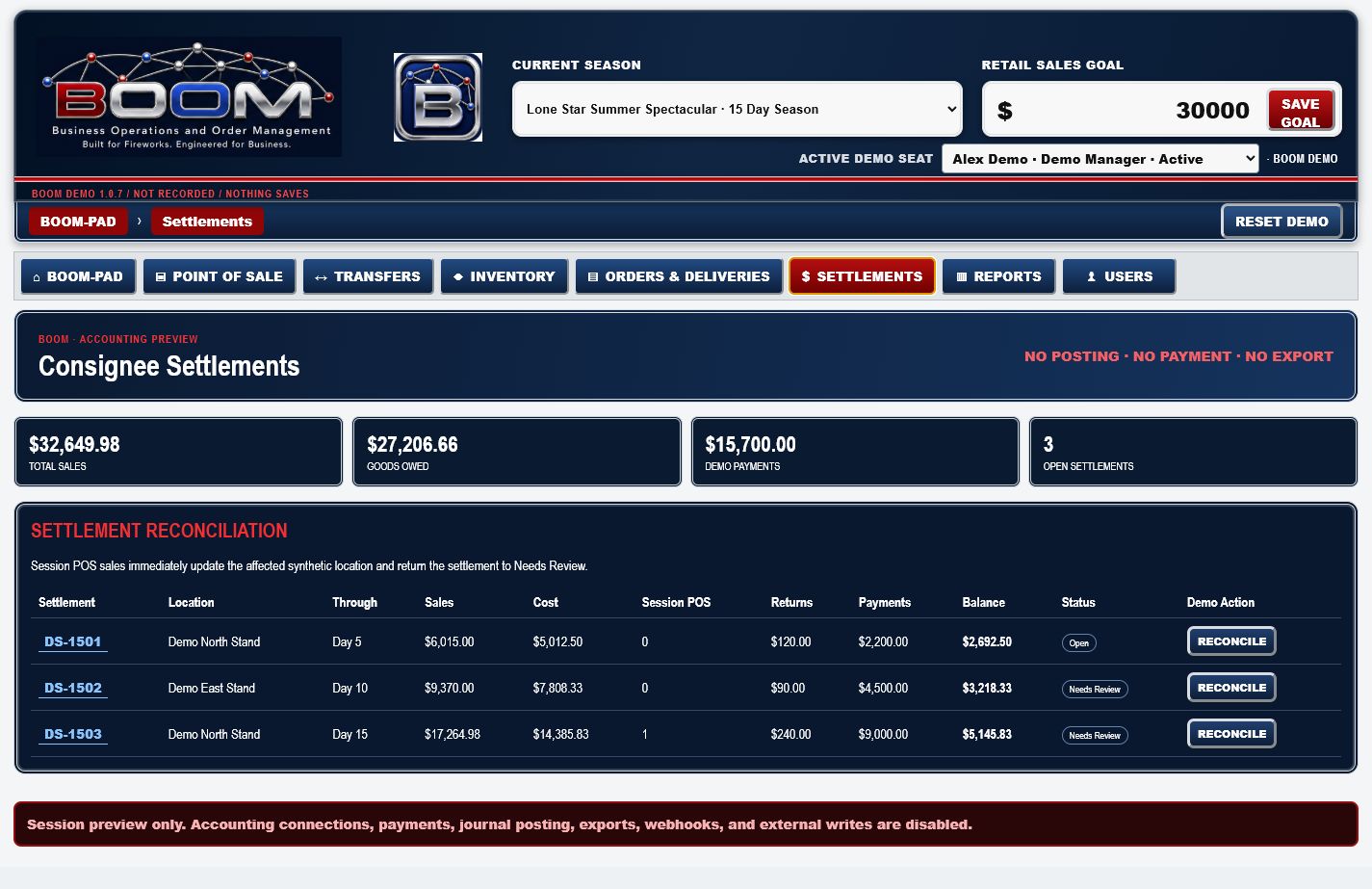
- Do you consign inventory to other retail vendors?BOOM separates each consignee’s inventory and sales, then reconciles balances, settlements, and what is owed.
- Do you have both wholesale and retail sales?BOOM runs wholesale and retail sales from the same product and inventory records—without double entry.
- Do you need BOOM?BOOM connects RFQs, purchasing, receiving, inventory, POS, consignments, reporting, and settlement in one system.
The system in action
One platform. Every moving part.
Real BOOM software—not stock photography. Configure a BOOM-PAD for one site, one warehouse, a selected group, or the entire operation and see the season at a glance.
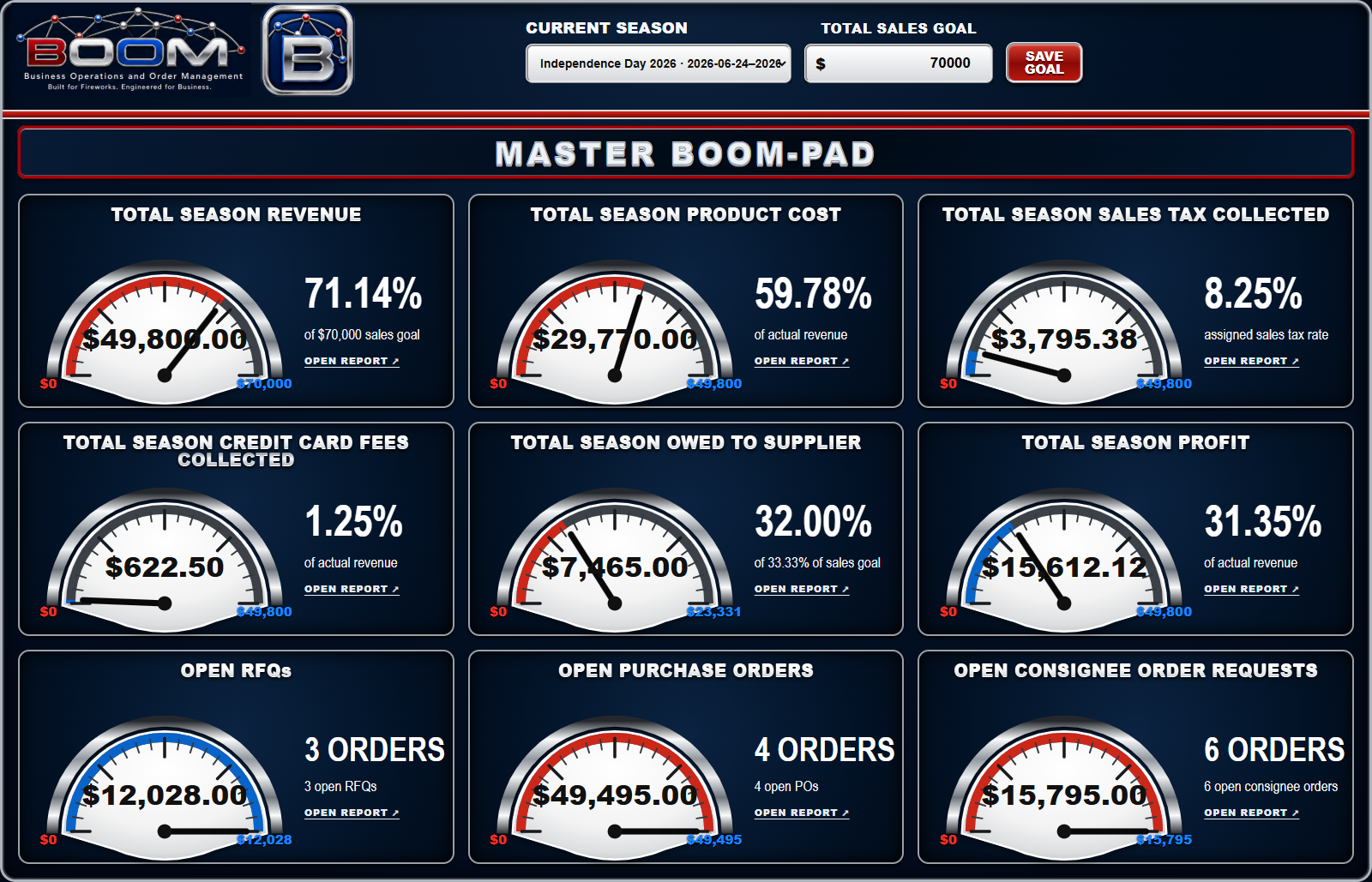
Open the report behind a gauge instead of accepting a mystery total with no path back to the source.
Owners see the complete operation. Authorized users see the locations, tools, and responsibilities assigned to them.
Purchasing, receiving, cases, eaches, inventory, sales, settlements, and reporting remain part of the same operating story.
From the gauge to the report. From the order to the shelf. From one location to the entire season.Ask how BOOM fits your operation
The operating bases inside BOOM
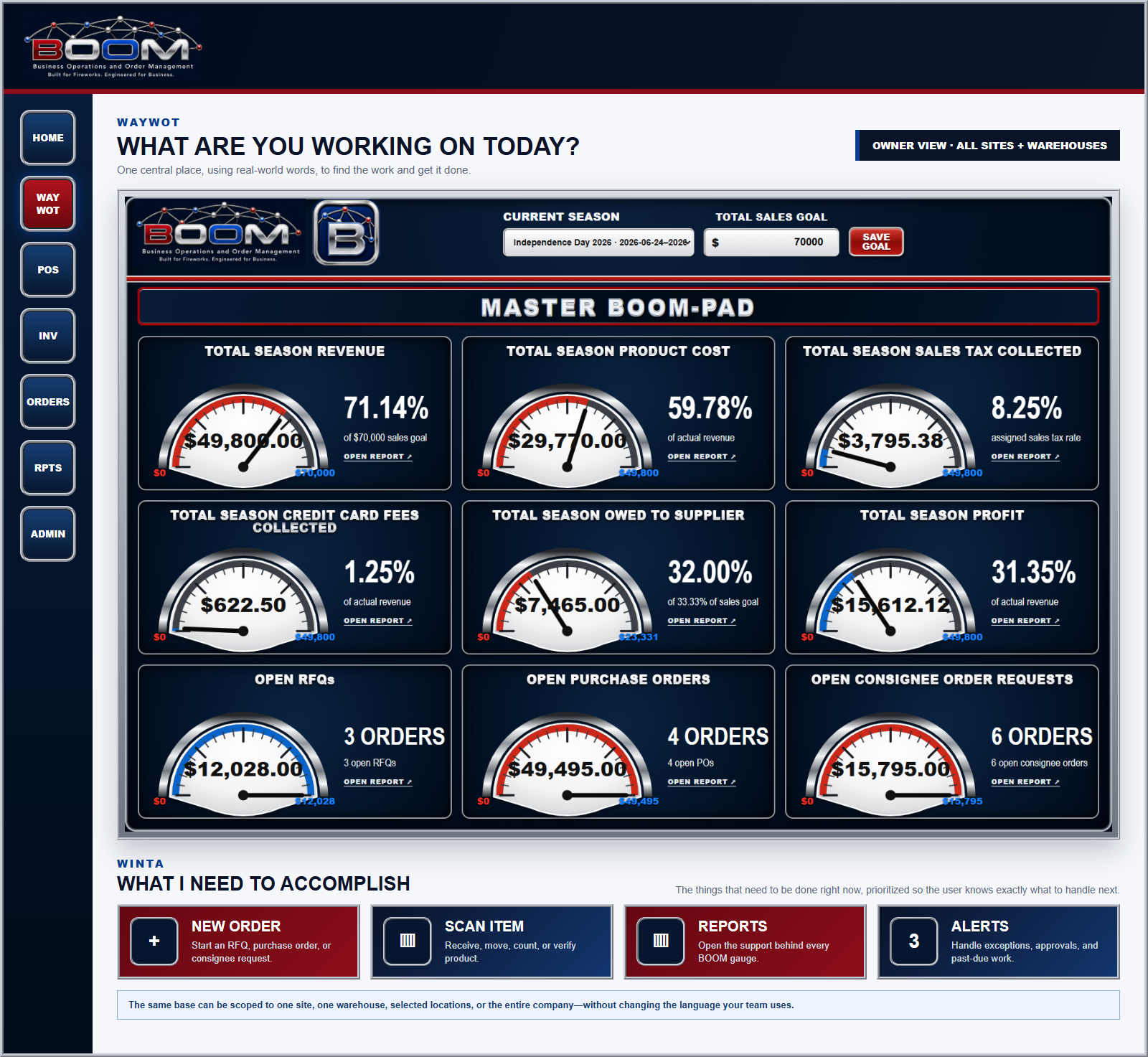
WAYWOT tells the team where to work. WINTA tells them what needs attention.
Together, the two bases turn a large operating system into a focused workday. Every user enters through the right scope, sees only the tools and locations they are authorized to use, and gets a prioritized view of the work that can move the business forward now.
What Are You Working On Today?
WAYWOT stands for “What Are You Working On Today?” It is the central place inside BOOM where people use real-world words—not software jargon—to find what they need and get things done. Sales, inventory, orders, deliveries, reports, accounting, and administration are organized around the work your team actually performs.
What I Need To Accomplish
WINTA stands for “What I Need To Accomplish.” It shows the things that need to be done right now—past-due work, approvals, exceptions, open operational items, and unresolved accounting activity—prioritized so the user knows exactly what to handle next.
Ordering and receiving built for the warehouse
Order clearly. Scan fast. Let BOOM handle the conversion.
Build the supplier order in the units the warehouse actually buys—cases, loose eaches, case cost, and extended totals. When the shipment arrives, open that exact purchase order by scanning its barcode or entering the PO number, then keep the scanner moving through case barcodes, each barcodes, or SKUs.
Order in real purchasing units
Build RFQs and purchase orders with cases, eaches, eaches-per-case, case cost, and extended totals—the same language used with the supplier and on the dock.
Scanner-first receiving
Continuous scanning counts every valid scan. Enter and Tab are captured so the warehouse team can keep working without fighting the screen.
Cases in. Eaches ready.
Receive full cases or loose eaches. BOOM uses each product’s case quantity to convert the receipt into total sellable eaches automatically.
Warehouse-safe controls
Partial receipts, previous receipts, remaining quantities, unexpected products, and over-receipts stay visible instead of disappearing into the inventory count.
WAYWOT — RECEIVINGReceive Inventory from an Open Purchase Order
1 Build supplier order→2 Open purchase order→3 Scan cases or eaches→4 Stock total eaches
ProductCelebration AssortmentSKU: CA-12 · 12 eaches per case
Received6 CASES
×Eaches / case12 EACHES
=Inventory added72 EACHES
Previously received2 cases / 24 eaches
This receipt6 cases / 72 eaches
Remaining0 eaches
COMPLETEUnexpected products and over-receipts are held as exceptions for review.
One connected operational record
From the first quote to the final settlement.
BOOM carries each decision and movement forward instead of forcing the team to rebuild the record at every handoff. Compare supplier quotes, award the buy, receive product into the right location, move stock where it is needed, sell it, capture the transaction, and reconcile the result in one connected operating story.
Role and location permissions keep each person in their assigned scope, while drill-through reports connect operating totals back to the synthetic records that support them.
- 01RFQ
- 02Compare and decide
- 03Purchase order
- 04Receive
- 05Locate inventory
- 06Transfer & replenish
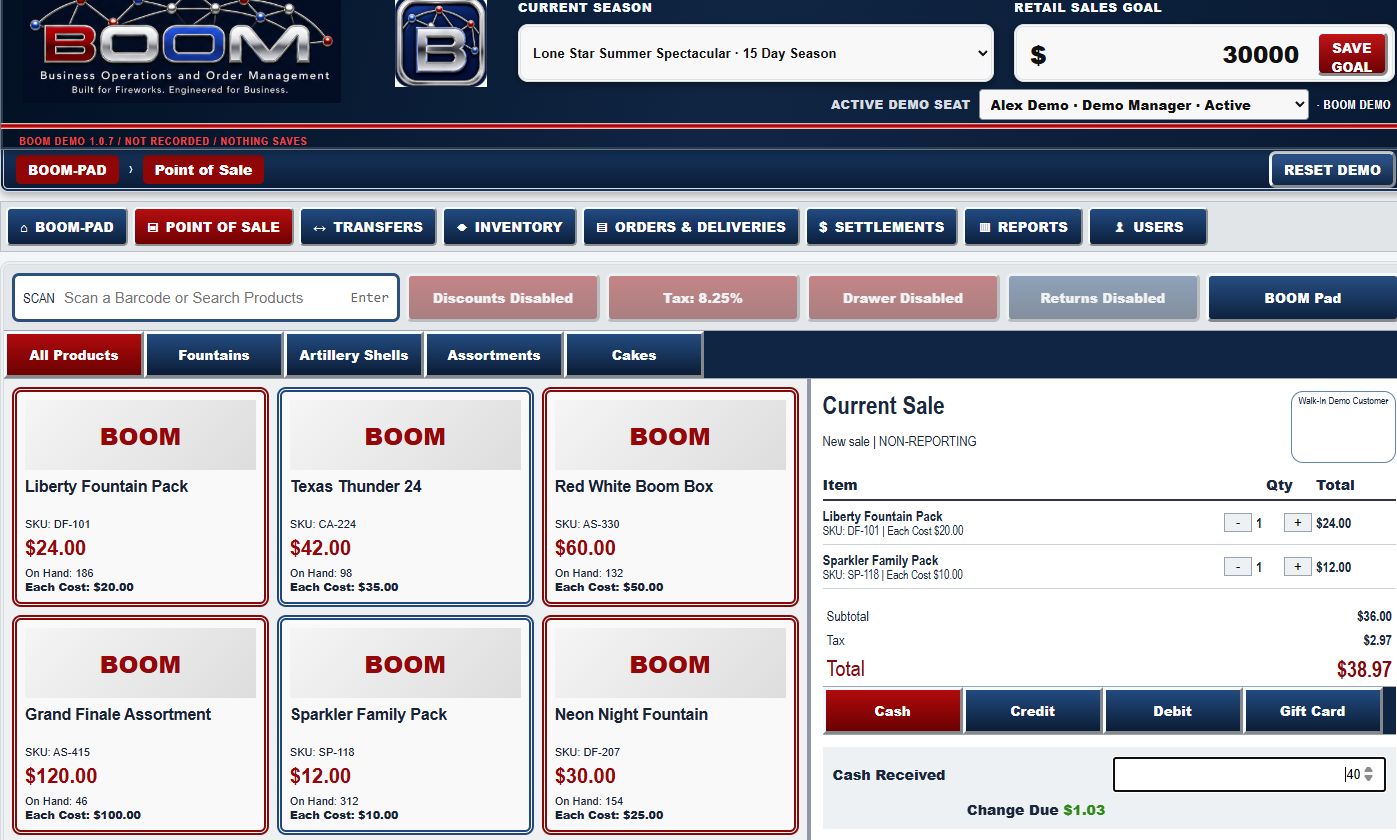
- 07POS sale
- 08Tender, tax & fees
- 09Inventory decrement
- 10Report & settle
01 / SELLCatalog to current sale
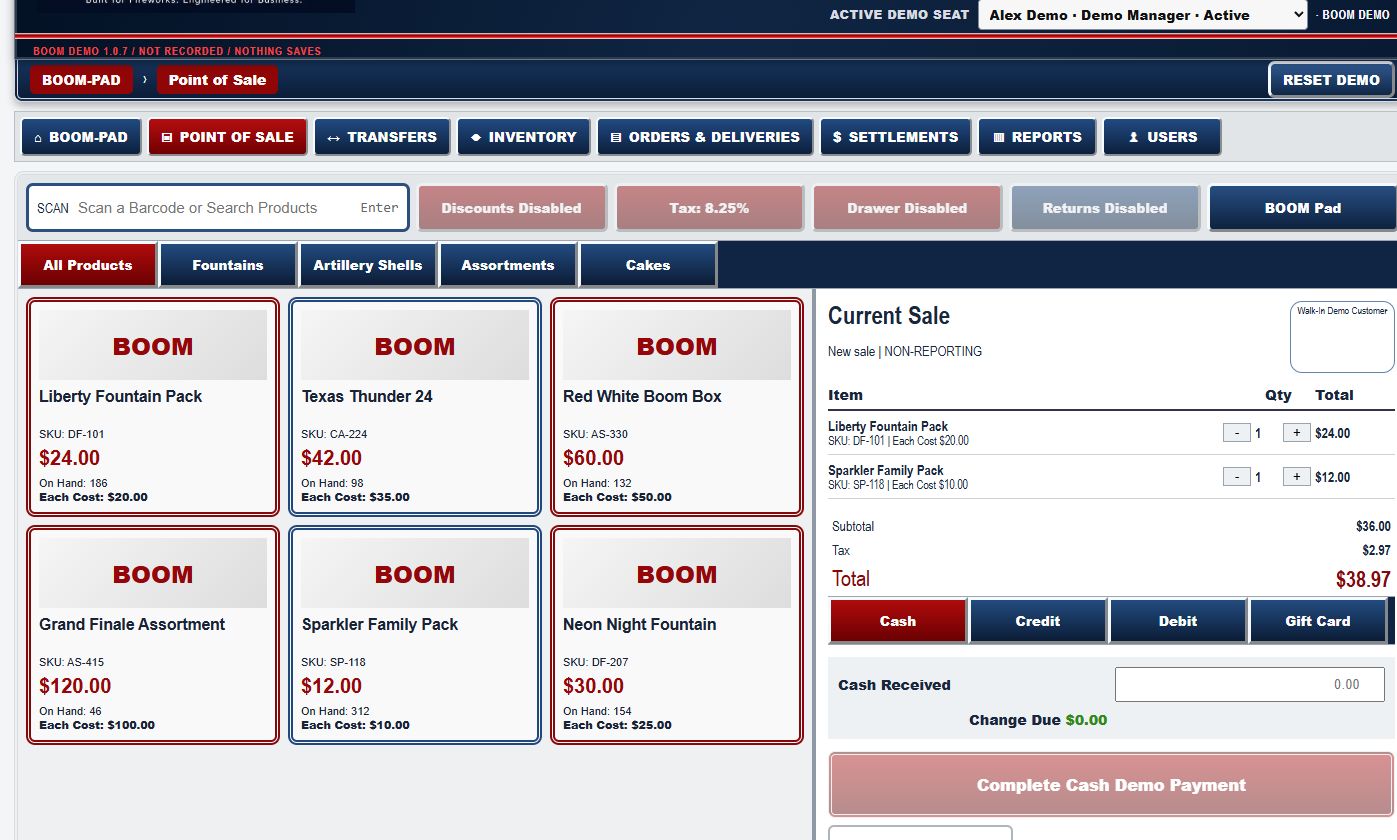
02 / CAPTURETender at the transaction
03 / RECONCILESale to settlement
One record. Fewer handoffs. Less re-entry.See the full synthetic workflow without touching production data.
Try the BOOM Demo
Not adapted for fireworks. Born here.
Built for fireworks people, by fireworks people.
BOOM was shaped inside Harleywood Pyrotechnics by people who understand the pressure of a real season—inventory arriving, stores opening, consignees moving product, teams selling fast, and every dollar needing to reconcile.
This is not generic software relabeled for fireworks. Every major view began with a real fireworks question: What needs attention today? Where is the product? What is selling? What is owed? Is the season on plan? BOOM is the operating system we wanted in our own fireworks business—now built for others who run the same demanding season.
Talk with the team behind BOOMWhy BOOM works
The season moves fast. BOOM keeps every part connected.
Fireworks operations do not behave like ordinary retail. Product arrives in waves, selling locations multiply, inventory moves between owners and consignees, and a short season can carry a year’s worth of pressure. BOOM brings those moving parts into one purpose-built system, so the team can move quickly without losing control.
Buy with the full picture
Connect purchasing, suppliers, cost, incoming inventory, and season goals before the first sale is made.
Put product where it performs
Track inventory across warehouses, stores, and consignee locations while keeping ownership and accountability clear.
See the season as it happens
Bring sales, progress, alerts, and performance into a live command center built for decisive seasonal management.
Finish clean and informed
Reconcile obligations, fees, inventory, consignee activity, and profit with the information already connected.
Less chasing. Fewer blind spots. Better decisions when every day of the season counts.
Purpose-built for fireworks
From first purchase order to final settlement.
Point of Sale
Fast, season-ready selling with operational visibility.
Inventory
Know what is on hand, where it is, and what it costs.
Purchasing
Manage suppliers, RFQs, orders, and incoming product.
Consignments
Connect owners, consignees, stores, and settlements.
Reporting
Turn seasonal activity into clear business decisions.
Administration
Control users, locations, seasons, and operating rules.
Built for fireworks people, by fireworks people.
Ready to build a smarter fireworks business?
Talk directly with a team that understands the season because we work in it too. Tell us about your operation and we’ll follow up with licensing and implementation information shaped around the way your fireworks business actually runs.
BOOM@harleywoodtx.com